You don't need a Bloomberg terminal or a pile of paid subscriptions to trade well. There are good free tools for charts, company research, results dates and position sizing. Here are the ten we rate most for UK traders in 2026, what each one is good for, and where its limits are.
What Makes a Good Free Trading Tool?
A useful free tool gives you reliable data, is quick to use, and doesn't hide the important parts behind a paywall. We looked at each tool on four things: how good the data is, what you can do without paying, how easy it is to use, and what it costs if you want more.
Most free market data covers US shares best, so several of the tools below are strongest for US companies. That suits the many UK traders who buy US shares, indices and forex through a UK broker or app.
The 10 Best Free Tools for UK Traders
1 TradingView (free plan)
TradingView is the charting platform most traders use, and the free plan is enough to get started. You get candlestick charts, more than 100 built-in indicators, drawing tools and a big community sharing chart ideas, in a web browser or the phone app.
The free plan lets you use 2 indicators per chart, 3 price alerts and one chart per tab. If you outgrow that, the paid plans add more indicators, alerts and charts on screen. You can also link a broker such as IG or Pepperstone and trade from the chart.
Best for: Charting and technical analysis on almost any market.
2 ChartsView company research
Our company research reports put the key facts about a company on one page: what it sells and how much of its revenue each part brings in, its latest results, its finances, its competitors and the main risks, with a live chart.
The reports stick to facts from company filings and results, so you can get up to speed on a company in a few minutes before you dig into the detail yourself.
Best for: Understanding a company quickly before you trade it.
3 ChartsView company trackers
The company trackers follow big names such as Tesla, Nvidia, Apple, Microsoft and Amazon every day. Each tracker lists the company's products and where they stand, its sales by quarter, its latest results and news from official sources, updated every morning.
They are the quickest way to see what has changed at a company you hold or watch, without reading every press release.
Best for: Keeping up with the companies you follow.
4 ChartsView stock screener
The stock screener filters US shares by things like valuation, dividend yield, company size and sector, so you can turn a market of hundreds of shares into a short list worth looking at.
It is simple to use, so it suits beginners, and the results link straight to a page for each share with a chart.
Best for: Finding US shares that match what you are looking for.
5 Earnings, dividend and IPO calendars
Results days move share prices more than almost anything else. The earnings calendar shows which companies report and when, the dividend calendar shows upcoming ex-dividend and payment dates, and the IPO calendar lists new companies coming to market.
Check them before you open a trade, so a results day or ex-dividend date doesn't catch you out.
Best for: Planning trades around the dates that move prices.
6 ChartsView trading tools
Our trading tools cover the jobs every trader does. The CFD position size calculator works out how big a trade can be for the money you are willing to lose. The market clock shows which markets are open in your time zone. The currency strength meter and technicals board give you a quick read on forex and indices.
There is also a backtest checker that tells you in plain words whether a strategy's test results are worth trusting.
Best for: Sizing trades and managing risk.
7 ChartsView portfolio tracker and watchlist
The portfolio tracker keeps all your holdings in one place, with prices and profit or loss for US shares in pounds or dollars. The watchlist keeps the shares you are watching on one screen.
Both are free once you join ChartsView. Read our guide on how to track your stock portfolio for tips.
Best for: Seeing how your investments are doing at a glance.
8 ChartsView forum and share tips leaderboard
The ChartsView forum has been running since 2012. Traders post chart setups, trade ideas and questions, and you can ask for a second opinion before you trade.
The share tips leaderboard records every tip with its entry, target and stop, then tracks how it actually did, so you can see whose ideas work over time.
Best for: Learning from other traders and testing ideas.
9 SEC EDGAR
EDGAR is the US regulator's free database of company filings. Every US-listed company's annual and quarterly reports are there, along with news announcements and directors' share dealings, straight from the source.
It is not pretty and takes some practice to search, but when you want to check a number for yourself, this is where it comes from.
Best for: Checking facts in a company's own reports.
10 Yahoo Finance
Yahoo Finance is one of the biggest free sources of market data, with years of company accounts, analyst forecasts, news and a basic screener.
The free version shows a lot of adverts and keeps some data for paying members, but for looking back over a company's accounts it is hard to beat for free.
Best for: Company accounts and analyst forecasts.
How These Tools Work Together
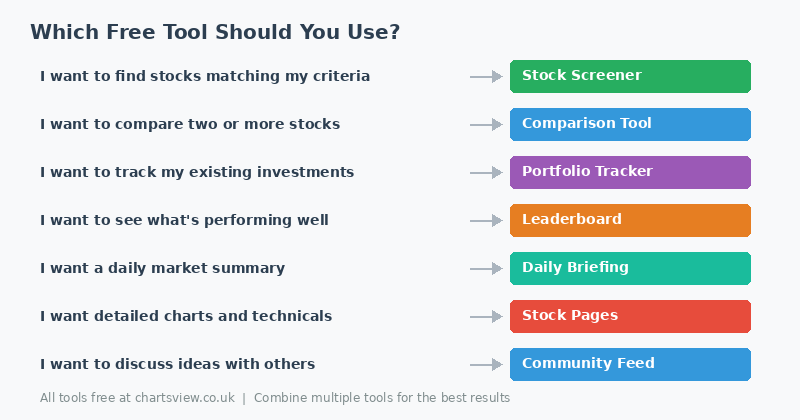
No single tool does everything, so most traders use a few together. A simple routine that costs nothing:
Find ideas with the screener or the forum. Read the research report or tracker for each one. Check the earnings calendar for results dates. Chart it on TradingView and plan your entry and stop. Size the trade with the position size calculator. Then add it to your portfolio or watchlist and keep an eye on it.
Quick Comparison Table
| Tool | Best feature | Markets | Ideal for |
|---|---|---|---|
| TradingView (free) | Charts and indicators | Global | Technical analysis |
| ChartsView research | Company facts on one page | US companies | Understanding a company |
| ChartsView trackers | Daily product and news updates | US companies | Following companies |
| ChartsView screener | Filters by valuation and yield | US shares | Finding ideas |
| Results calendars | Earnings, dividend and IPO dates | US shares | Timing trades |
| ChartsView tools | Position size calculator | Indices, FX, gold | Managing risk |
| Portfolio and watchlist | Profit and loss in £ or $ | US shares | Tracking holdings |
| Forum and leaderboard | Tips tracked to the result | Shares, indices, FX | Ideas and learning |
| SEC EDGAR | Official filings | US companies | Checking facts |
| Yahoo Finance | Years of company accounts | Global | Deep research |
Key Takeaway
You don't need expensive subscriptions to trade well. TradingView's free plan for charts, ChartsView for research, results dates and position sizing, and EDGAR or Yahoo Finance for checking the numbers will cover most of what you need, without spending a penny.
What to Look for When Choosing Your Tools
Which markets it covers
Free data is best for US shares. If you trade other markets, check what a tool covers before you rely on it.
How fresh the data is
Live prices matter for short-term trading. For research and screening, prices from the last close are usually fine. Many free tools show prices delayed by 15 minutes, so check before you trade on them.
Ease of use
A tool with lots of features is no use if you can't find your way round it. If you spend longer learning the tool than looking at the market, try another one.
No hidden costs
Some "free" tools hold back the useful parts for paying members. Everything on this list does something useful for free, and we have said where paid plans exist.
Getting Started Today
Start with whatever fits where you are now. If you are looking for ideas, begin with the screener or the forum. If you already hold shares, set up the portfolio tracker first.
Tools only help if you use them with care. A screener shows you possibilities, but the decision is still yours, so do your own research and only risk money you can afford to lose.
Start Your Research for Free
Every ChartsView tool on this list is free. Join the community to use the portfolio tracker and watchlist and post in the forum.
Browse company research